Power user
How to continue a long ChatGPT or Claude chat after hitting the length limit
If your chat hasn’t locked yet, ask for a handoff summary and paste it into a new chat — free, 30 seconds, no tools.
Once you see ChatGPT’s “maximum length for this conversation” or Claude’s “exceed the length limit for this chat”, the input box is done. Waiting won’t reset it; pull the thread out as a file and attach it to a fresh chat.
| Method | Works locked? | Whole chat? | Wait | Best for |
|---|---|---|---|---|
| Summary prompt | No | Summary only | ~1 min | Before the chat locks |
| Copy-paste / print | Partly | Drops the middle | 2–5 min | Short threads |
| Official export | Yes | Whole account (JSON) | Hours–days | Full account backup |
| Carry | Yes | One .md per chat | ~2 min | Locked chats right now |
Before the chat locks: the free summary handoff
When answers start getting slow or repetitive, don’t wait for the wall. Send one last message in the same thread:
Write a handoff brief so we can continue in a new chat. Include our goal, every decision we locked in, key constraints, exact file names or code still in play, and what we’re doing next. Skip pleasantries.
Copy the reply into a new chat as your first message. Once ChatGPT or Claude locks the thread, though, you can’t send this prompt.
Already locked: why copy-paste drops the middle
Both ChatGPT and Claude only render the turns near your screen. Select-all or print-to-PDF on a 150-turn thread often gives you the top, the bottom, and a hole in the middle.
Official exports from OpenAI and Anthropic include the whole chat, but they email a full-account JSON dump hours or days later.
Whatever method you use to grab a locked chat, check the file before you rely on it:
- The first prompt is at the top.
- The last reply before the lock is at the bottom.
- A specific phrase from the middle shows up when you search the file.
- Code blocks and tables didn’t collapse into one line.
Continue in a new chat or project
Once you have the full thread as a Markdown file, hand it to a fresh chat:
- Save the locked chat as a single
.mdfile so every turn and code block stays intact. - Open a new chat — or a project in ChatGPT or Claude if you’ll keep coming back to this work.
- Attach the
.mdfile and any uploads you still need. If Claude’s picker refuses.md, rename it to.txt. - Send a short prompt: “This file is our previous chat, which hit the length limit. Confirm the current state in 5 bullets, and let’s pick up from the last message.”
Attaching a 200-turn transcript to a normal chat eats the new window fast. Put it in a project instead, or ask the new chat to condense it into a one-page brief and start fresh from that.
Keep long chats saved as files with Carry
Carry, the extension we make, saves each ChatGPT and Claude chat as a Markdown file in a folder you own — including uploads.
Because it reads from your signed-in account instead of scraping the screen, long locked chats save whole, and active chats stay updated while your browser is open. Carry never uploads your chats to Carry’s servers.
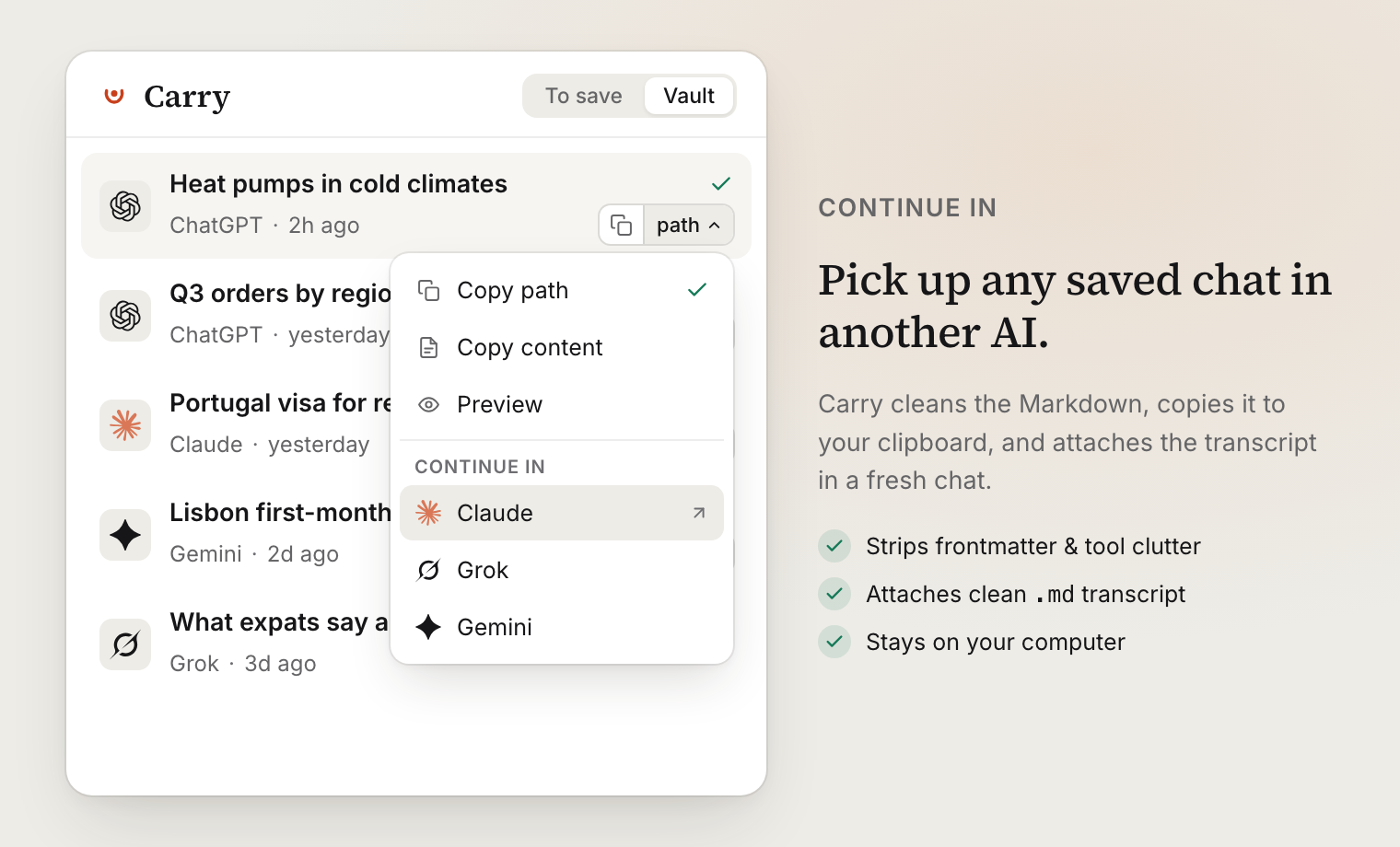
Once you pick a folder and connect ChatGPT or Claude, Carry saves the locked thread whole. From the Vault tab — or inside Carry’s note preview — choose Continue in to open a fresh chat in another AI with the cleaned .md file attached, or highlight just the final section to continue with only the part that matters.
Click a file in this sample folder to see what a saved chat looks like:
- carry-backup
- chatgpt
- 2026-09-16-q3-orders-by-region.md17 Sep
- 2026-10-03-heat-pumps-in-cold-climates.md3 Oct
- files
- q3_orders_by_region.csv17 Sep
- projects
- Office moveproject
- 2026-10-08-moving-day-checklist.md8 Oct
- files
- floor-plan.pdf8 Oct
- move-notes.md8 Oct
- moving-day-checklist.docx8 Oct
- instructions.md8 Oct
- Office move.md8 Oct
- claude
- 2026-09-07-pomodoro-timer-page.md7 Sep
- files
- Pomodoro timer.html7 Sep
- projects
- Thesis researchproject
- 2026-10-03-chapter-2-reading-plan.md3 Oct
- files
- district-heat-map.png3 Oct
- interview-notes.md3 Oct
- night-temperatures-2025.xlsx3 Oct
- instructions.md3 Oct
- Thesis research.md3 Oct
2026-09-16-q3-orders-by-region.md2 KB
A data analysis chat
---
conversation_id: "66e85b2f-1c4a-8003-9d2e-7a41c0f3b9e2"
source: chatgpt
type: conversation
title: "Q3 orders by region"
aliases:
- "Q3 orders by region"
tags:
- capture/chatgpt
created: 2026-09-16T16:20:05
updated: "2026-09-16T16:27:41.318Z"
verified_list_token: "2026-09-16T16:27:41.318Z"
conversation_files_fetched: true
synced: 2026-09-17T10:59:12
url: "https://chatgpt.com/c/66e85b2f-1c4a-8003-9d2e-7a41c0f3b9e2"
capture_gaps:
- files
parser_id: "p2:4bd144f59343bd06b194526eef21531d88abef0279ddf7066cdfb5429f11b8b3:chatgpt-format=3,claude-format=6,grok-format=2,message-order=2,tool-output=5"
message_count: 4
capture_version: 2
content_hash: sha256:44524063934983f7a24e7992968ddc6485123b74fe88ca20872df85342ff2c30
---
**Human**
Our Q3 orders by region, July to September:
```
North  1240, 1388, 1515
South   980, 1011, 1042
West   1410, 1552, 1688
East    760,  842,  931
```
Which region grew fastest? Give me a table and a CSV I can open in Sheets.
**Assistant**
East grew fastest in percentage terms, just ahead of North. West added the most orders overall.
| Region | July | September | Change |
| --- | ---: | ---: | ---: |
| East | 760 | 931 | +22.5% |
| North | 1,240 | 1,515 | +22.2% |
| West | 1,410 | 1,688 | +19.7% |
| South | 980 | 1,042 | +6.3% |
To recompute the change column yourself:
```python
import pandas as pd

df = pd.read_csv("q3_orders_by_region.csv")
df["change"] = df["september"] / df["july"] - 1
print(df.sort_values("change", ascending=False))
```
[Download the CSV](files/q3_orders_by_region.csv)
**Human**
Can you chart it too? A simple bar chart is fine.
**Assistant**
Here it is: July and September side by side for each region.
[Download the chart](sandbox:/mnt/data/q3_orders_chart.png)
> [!missing] File: q3\_orders\_chart.png — file could not be downloaded- title
- Q3 orders by region
- tags
- capture/chatgpt
- created
- 2026-09-16T16:20:05
- url
- Open in ChatGPT
+13 more fieldsHide 13 fields
- conversation_
id - 66e85b2f-1c4a-8003-9d2e-7a41c0f3b9e2
- source
- chatgpt
- type
- conversation
- aliases
- Q3 orders by region
- updated
- 2026-09-16T16:27:41.318Z
- verified_
list_ token - 2026-09-16T16:27:41.318Z
- conversation_
files_ fetched - true
- synced
- 2026-09-17T10:59:12
- capture_
gaps - files
- parser_
id - p2:4bd144f59343bd06b194526eef21531d88abef0279ddf7066cdfb5429f11b8b3:chatgpt-format=3,claude-format=6,grok-format=2,message-order=2,tool-output=5
- message_
count - 4
- capture_
version - 2
- content_
hash - sha256:44524063934983f7a24e7992968ddc6485123b74fe88ca20872df85342ff2c30
Human
Our Q3 orders by region, July to September:
North 1240, 1388, 1515
South 980, 1011, 1042
West 1410, 1552, 1688
East 760, 842, 931Which region grew fastest? Give me a table and a CSV I can open in Sheets.
Assistant
East grew fastest in percentage terms, just ahead of North. West added the most orders overall.
| Region | July | September | Change |
|---|---|---|---|
| East | 760 | 931 | +22.5% |
| North | 1,240 | 1,515 | +22.2% |
| West | 1,410 | 1,688 | +19.7% |
| South | 980 | 1,042 | +6.3% |
To recompute the change column yourself:
import pandas as pd
df = pd.read_csv("q3_orders_by_region.csv")
df["change"] = df["september"] / df["july"] - 1
print(df.sort_values("change", ascending=False))Human
Can you chart it too? A simple bar chart is fine.
Assistant
Here it is: July and September side by side for each region.
Download the chart
File: q3_orders_chart.png — file could not be downloaded
2026-10-03-heat-pumps-in-cold-climates.md3 KB
A Deep Research report, saved inside its chat
---
conversation_id: "670e3a91-5c2d-8001-b4f7-2e9d18c6a053"
source: chatgpt
type: conversation
title: "Heat pumps in cold climates"
aliases:
- "Heat pumps in cold climates"
tags:
- capture/chatgpt
created: 2026-10-03T08:14:22
updated: "2026-10-03T08:31:09.552Z"
verified_list_token: "2026-10-03T08:31:09.552Z"
conversation_files_fetched: true
synced: 2026-10-03T08:47:30
url: "https://chatgpt.com/c/670e3a91-5c2d-8001-b4f7-2e9d18c6a053"
message_count: 2
capture_version: 2
content_hash: sha256:00a623e4dbb58e72633ab7801f12e6cc0b961d4770b8a5568a965f14fb796467
---
**Human**
Research how well air-source heat pumps work in cold climates. Compare efficiency below freezing, running costs against a gas boiler, and what installers recommend for older houses.
**Assistant**
# Air-source heat pumps in cold climates
## Summary
Cold-climate heat pumps keep heating well below freezing, but they get less efficient as it gets colder. Whether one costs less to run than a gas boiler depends mostly on local electricity and gas prices, and on how well the house holds heat.
## How efficiency changes with temperature
Efficiency is measured as the coefficient of performance (COP): units of heat delivered for each unit of electricity used.
| Outdoor temperature | Cold-climate model | Standard model |
| --- | --- | --- |
| 7 °C | 3.5–4.5 | 3–4 |
| −8 °C | 2.3–3 | 1.8–2.5 |
| −15 °C | 1.8–2.5 | 1.3–2 |
| −25 °C | 1.3–1.8 | Often switches to backup heat |
Even at a COP of 1.5, a heat pump gives more heat per kilowatt-hour than a plain electric heater, which has a COP of 1.
## Running costs against a gas boiler
Divide the electricity price by the seasonal COP, and the gas price by the boiler's efficiency (about 0.9 for a modern condensing boiler). The lower number is the cheaper heat.
- **Electricity at 0.30 per kWh, seasonal COP of 3:** 0.10 per kWh of heat.
- **Gas at 0.08 per kWh, boiler 90% efficient:** about 0.09 per kWh of heat.
At these prices the two are close. Better insulation or a time-of-use tariff tips the balance toward the heat pump.
## What installers recommend for older houses
1. **Do a room-by-room heat loss calculation** before sizing the unit. An oversized unit cycles on and off and loses efficiency.
2. **Check radiator sizes.** Heat pumps work best at lower flow temperatures (35–50 °C), so some rooms may need larger radiators.
3. **Fix the cheap insulation first:** loft insulation, draught-proofing and pipe lagging.
4. **Plan for a hot water cylinder.** Most heat pump systems need one.
## What to ask an installer
- A seasonal efficiency estimate for your climate, not just the rated COP at 7 °C.
- How often the backup heater is expected to run in the coldest weeks.
- Whether the quote includes radiator upgrades and controls.- title
- Heat pumps in cold climates
- tags
- capture/chatgpt
- created
- 2026-10-03T08:14:22
- url
- Open in ChatGPT
+11 more fieldsHide 11 fields
- conversation_
id - 670e3a91-5c2d-8001-b4f7-2e9d18c6a053
- source
- chatgpt
- type
- conversation
- aliases
- Heat pumps in cold climates
- updated
- 2026-10-03T08:31:09.552Z
- verified_
list_ token - 2026-10-03T08:31:09.552Z
- conversation_
files_ fetched - true
- synced
- 2026-10-03T08:47:30
- message_
count - 2
- capture_
version - 2
- content_
hash - sha256:00a623e4dbb58e72633ab7801f12e6cc0b961d4770b8a5568a965f14fb796467
Human
Research how well air-source heat pumps work in cold climates. Compare efficiency below freezing, running costs against a gas boiler, and what installers recommend for older houses.
Assistant
Air-source heat pumps in cold climates
Summary
Cold-climate heat pumps keep heating well below freezing, but they get less efficient as it gets colder. Whether one costs less to run than a gas boiler depends mostly on local electricity and gas prices, and on how well the house holds heat.
How efficiency changes with temperature
Efficiency is measured as the coefficient of performance (COP): units of heat delivered for each unit of electricity used.
| Outdoor temperature | Cold-climate model | Standard model |
|---|---|---|
| 7 °C | 3.5–4.5 | 3–4 |
| −8 °C | 2.3–3 | 1.8–2.5 |
| −15 °C | 1.8–2.5 | 1.3–2 |
| −25 °C | 1.3–1.8 | Often switches to backup heat |
Even at a COP of 1.5, a heat pump gives more heat per kilowatt-hour than a plain electric heater, which has a COP of 1.
Running costs against a gas boiler
Divide the electricity price by the seasonal COP, and the gas price by the boiler's efficiency (about 0.9 for a modern condensing boiler). The lower number is the cheaper heat.
- Electricity at 0.30 per kWh, seasonal COP of 3: 0.10 per kWh of heat.
- Gas at 0.08 per kWh, boiler 90% efficient: about 0.09 per kWh of heat.
At these prices the two are close. Better insulation or a time-of-use tariff tips the balance toward the heat pump.
What installers recommend for older houses
- Do a room-by-room heat loss calculation before sizing the unit. An oversized unit cycles on and off and loses efficiency.
- Check radiator sizes. Heat pumps work best at lower flow temperatures (35–50 °C), so some rooms may need larger radiators.
- Fix the cheap insulation first: loft insulation, draught-proofing and pipe lagging.
- Plan for a hot water cylinder. Most heat pump systems need one.
What to ask an installer
- A seasonal efficiency estimate for your climate, not just the rated COP at 7 °C.
- How often the backup heater is expected to run in the coldest weeks.
- Whether the quote includes radiator upgrades and controls.
q3_orders_by_region.csv149 bytes
The CSV ChatGPT made, saved as the original file
| region | july | august | september | change_jul_to_sep |
|---|---|---|---|---|
| North | 1240 | 1388 | 1515 | 0.222 |
| South | 980 | 1011 | 1042 | 0.063 |
| West | 1410 | 1552 | 1688 | 0.197 |
| East | 760 | 842 | 931 | 0.225 |
2026-10-08-moving-day-checklist.md1 KB
A project chat
---
conversation_id: "67014e2c-5a9d-8004-b1c7-3f8e2d6a0b45"
source: chatgpt
type: conversation
title: "Moving day checklist"
aliases:
- "Moving day checklist"
tags:
- capture/chatgpt
created: 2026-10-08T14:02:31
updated: "2026-10-08T14:05:12.904Z"
verified_list_token: "2026-10-08T14:05:12.904Z"
conversation_files_fetched: true
synced: 2026-10-08T14:20:36
url: "https://chatgpt.com/c/67014e2c-5a9d-8004-b1c7-3f8e2d6a0b45"
project: "Office move"
message_count: 2
capture_version: 2
content_hash: sha256:dc1fadeefea1fec52ff71fb90503df5c9aab652b1420faa1cfb2ada0be471941
---
**Human**
Write a moving day checklist for the team as a Word document. Use the move notes, and split it into the day before and the day itself.
**Assistant**
Here is the checklist, split into the two days:
**Thursday 13 November**
- Pack your desk into two crates.
- Label each crate with your new desk number from the floor plan.
- Leave monitors for IT to disconnect in the afternoon.
**Friday 14 November**
- Movers arrive at 8:00.
- Find your crates at your new desk.
- Report anything missing to facilities.
[Download the checklist](files/moving-day-checklist.docx)- title
- Moving day checklist
- tags
- capture/chatgpt
- created
- 2026-10-08T14:02:31
- url
- Open in ChatGPT
- project
- Office move
+11 more fieldsHide 11 fields
- conversation_
id - 67014e2c-5a9d-8004-b1c7-3f8e2d6a0b45
- source
- chatgpt
- type
- conversation
- aliases
- Moving day checklist
- updated
- 2026-10-08T14:05:12.904Z
- verified_
list_ token - 2026-10-08T14:05:12.904Z
- conversation_
files_ fetched - true
- synced
- 2026-10-08T14:20:36
- message_
count - 2
- capture_
version - 2
- content_
hash - sha256:dc1fadeefea1fec52ff71fb90503df5c9aab652b1420faa1cfb2ada0be471941
Human
Write a moving day checklist for the team as a Word document. Use the move notes, and split it into the day before and the day itself.
Assistant
Here is the checklist, split into the two days:
Thursday 13 November
- Pack your desk into two crates.
- Label each crate with your new desk number from the floor plan.
- Leave monitors for IT to disconnect in the afternoon.
Friday 14 November
- Movers arrive at 8:00.
- Find your crates at your new desk.
- Report anything missing to facilities.
floor-plan.pdf186 KB
A PDF added to the project, saved as the original file.
move-notes.md260 bytes
A Markdown file added to the project, saved as it is
# Move notes

- Movers arrive at 8:00 on Friday 14 November.
- Each person packs their own desk into two crates.
- IT disconnects monitors on Thursday afternoon.
- Kitchen and meeting rooms are packed by facilities.
- New desks are numbered on the floor plan.
Move notes
- Movers arrive at 8:00 on Friday 14 November.
- Each person packs their own desk into two crates.
- IT disconnects monitors on Thursday afternoon.
- Kitchen and meeting rooms are packed by facilities.
- New desks are numbered on the floor plan.
moving-day-checklist.docx39 KB
The Word document ChatGPT made in the project chat, saved as the original file.
instructions.md153 bytes
The project’s instructions, as written in ChatGPT
We are moving the team to the fourth floor on 14 November.

- Keep answers short and practical.
- Use the floor plan and the move notes in this project.
We are moving the team to the fourth floor on 14 November.
- Keep answers short and practical.
- Use the floor plan and the move notes in this project.
Office move.md549 bytes
The project’s index note
---
source: chatgpt
project_id: "g-p-68f0c2a91b7c8191a4e5d3b02f6c9e17"
url: "https://chatgpt.com/g/g-p-68f0c2a91b7c8191a4e5d3b02f6c9e17/project"
archived: false
---# Office move
- **Provider**: ChatGPT
- **Project ID**: `g-p-68f0c2a91b7c8191a4e5d3b02f6c9e17`
- **Link**: https://chatgpt.com/g/g-p-68f0c2a91b7c8191a4e5d3b02f6c9e17/project
- **Instructions**: [instructions.md](instructions.md)
## Files
- [floor-plan.pdf](files/floor-plan.pdf)
- [move-notes.md](files/move-notes.md)
- [moving-day-checklist.docx](files/moving-day-checklist.docx)- url
- Open in ChatGPT
+3 more fieldsHide 3 fields
- source
- chatgpt
- project_
id - g-p-68f0c2a91b7c8191a4e5d3b02f6c9e17
- archived
- false
Office move
- Provider: ChatGPT
- Project ID:
g-p-68f0c2a91b7c8191a4e5d3b02f6c9e17 - Link: https://chatgpt.com/g/g-p-68f0c2a91b7c8191a4e5d3b02f6c9e17/project
- Instructions: instructions.md
Files
2026-09-07-pomodoro-timer-page.md1 KB
A chat with an artifact
---
conversation_id: "3f6a9c2e-8b14-4d7a-9e05-6c1b2d4f8a13"
source: claude
type: conversation
title: "Pomodoro timer page"
aliases:
- "Pomodoro timer page"
tags:
- capture/claude
created: 2026-09-07T13:02:18
updated: "2026-09-07T13:09:44.617Z"
verified_list_token: "2026-09-07T13:09:44.617Z"
conversation_files_fetched: true
synced: 2026-09-07T13:30:05
url: "https://claude.ai/chat/3f6a9c2e-8b14-4d7a-9e05-6c1b2d4f8a13"
documents:
- "Pomodoro timer"
message_count: 4
capture_version: 2
content_hash: sha256:fe6ae9c9c99d81890177ba2d7dc46718cee5e2ec0a6fb7eb33d14d2b4592ccc8
---
**Human**
Make me a simple pomodoro timer I can open in a browser. 25 minutes of focus, 5 minutes of break, and one start/pause button.
**Assistant**
> [!note]- Thought for 6s
> Planning a single-file page with a countdown and one button
Here is a single-file timer page. It counts down 25 minutes of focus, then a 5-minute break, and the tab title shows the time left so you can see it from another tab.
Open it in any browser. Press Space to start or pause.
**Human**
Can it play a sound when the timer ends?
**Assistant**
Yes. It now plays a short beep from the Web Audio API, so there is no sound file to load.
Browsers only allow sound after a click on the page, so the first beep needs one press of Start, which you do anyway.
### 📄 Pomodoro timer
[Pomodoro timer](files/Pomodoro%20timer.html)
<!doctype html>
<html lang="en">
<head>- title
- Pomodoro timer page
- tags
- capture/claude
- created
- 2026-09-07T13:02:18
- url
- Open in Claude
+12 more fieldsHide 12 fields
- conversation_
id - 3f6a9c2e-8b14-4d7a-9e05-6c1b2d4f8a13
- source
- claude
- type
- conversation
- aliases
- Pomodoro timer page
- updated
- 2026-09-07T13:09:44.617Z
- verified_
list_ token - 2026-09-07T13:09:44.617Z
- conversation_
files_ fetched - true
- synced
- 2026-09-07T13:30:05
- documents
- Pomodoro timer
- message_
count - 4
- capture_
version - 2
- content_
hash - sha256:fe6ae9c9c99d81890177ba2d7dc46718cee5e2ec0a6fb7eb33d14d2b4592ccc8
Human
Make me a simple pomodoro timer I can open in a browser. 25 minutes of focus, 5 minutes of break, and one start/pause button.
Assistant
Thought for 6s
Planning a single-file page with a countdown and one button
Here is a single-file timer page. It counts down 25 minutes of focus, then a 5-minute break, and the tab title shows the time left so you can see it from another tab.
Open it in any browser. Press Space to start or pause.
Human
Can it play a sound when the timer ends?
Assistant
Yes. It now plays a short beep from the Web Audio API, so there is no sound file to load.
Browsers only allow sound after a click on the page, so the first beep needs one press of Start, which you do anyway.
📄 Pomodoro timer
Pomodoro timer.html2 KB
The artifact itself, a page you can open in any browser
<!doctype html>
<html lang="en">
<head>
  <meta charset="utf-8">
  <meta name="viewport" content="width=device-width, initial-scale=1">
  <title>Pomodoro timer</title>
  <style>
    body { margin: 0; min-height: 100vh; display: grid; place-items: center;
      font-family: system-ui, sans-serif; background: #f7f4ee; color: #222; }
    main { text-align: center; }
    .mode { letter-spacing: 0.08em; text-transform: uppercase; color: #777; }
    .time { margin: 0.2em 0; font-size: 5rem; font-variant-numeric: tabular-nums; }
    button { font: inherit; padding: 0.6rem 1.6rem; border-radius: 8px;
      border: 1px solid #ccc; background: #fff; cursor: pointer; }
  </style>
</head>
<body>
  <main>
    <p class="mode" id="mode">Focus</p>
    <p class="time" id="time">25:00</p>
    <button id="toggle">Start</button>
  </main>
  <script>
    const FOCUS = 25 * 60;
    const BREAK = 5 * 60;
    let left = FOCUS;
    let onBreak = false;
    let tick = null;

    const time = document.getElementById('time');
    const mode = document.getElementById('mode');
    const toggle = document.getElementById('toggle');

    function show() {
      const m = String(Math.floor(left / 60)).padStart(2, '0');
      const s = String(left % 60).padStart(2, '0');
      time.textContent = m + ':' + s;
      document.title = m + ':' + s + ' · ' + (onBreak ? 'Break' : 'Focus');
    }

    function beep() {
      const audio = new AudioContext();
      const tone = audio.createOscillator();
      tone.frequency.value = 880;
      tone.connect(audio.destination);
      tone.start();
      tone.stop(audio.currentTime + 0.4);
    }

    function step() {
      left -= 1;
      if (left < 0) {
        beep();
        onBreak = !onBreak;
        left = onBreak ? BREAK : FOCUS;
        mode.textContent = onBreak ? 'Break' : 'Focus';
      }
      show();
    }

    toggle.addEventListener('click', () => {
      if (tick) {
        clearInterval(tick);
        tick = null;
        toggle.textContent = 'Start';
      } else {
        tick = setInterval(step, 1000);
        toggle.textContent = 'Pause';
      }
    });

    document.addEventListener('keydown', (e) => {
      if (e.code === 'Space') { e.preventDefault(); toggle.click(); }
    });

    show();
  </script>
</body>
</html>
2026-10-03-chapter-2-reading-plan.md2 KB
A project chat
---
conversation_id: "b18d4e07-6a3c-4f92-8d15-0e7c9a2b4f61"
source: claude
type: conversation
title: "Chapter 2 reading plan"
aliases:
- "Chapter 2 reading plan"
tags:
- capture/claude
created: 2026-10-03T09:12:40
updated: "2026-10-03T09:14:02.905Z"
verified_list_token: "2026-10-03T09:14:02.905Z"
conversation_files_fetched: true
synced: 2026-10-03T09:40:21
url: "https://claude.ai/chat/b18d4e07-6a3c-4f92-8d15-0e7c9a2b4f61"
project: "Thesis research"
documents:
- "Chapter 2 reading plan"
document_versions:
- document_index: 0
artifact_id: "chapter-2-reading-plan"
version_id: "e4b0c2d1-7f3a-4c86-9b25-1a6d8e0f3c74"
message_count: 2
capture_version: 2
content_hash: sha256:56299c02a343cf91fefb2899ed40f898edec6600853c64140f337a2fb3952a3b
---
**Human**
Draft a two-week reading plan for chapter 2. Mostly measurement first, then policy. Use my interview notes.
**Assistant**
> [!note]- Thought for 9s
> Ordering the reading from measurement to policy
> Fitting the interview notes into week 2
Here is a plan that moves from measurement to policy, with your interview notes in week 2. The district heat map from interview 3 makes a good baseline for week 1.
### 📄 Chapter 2 reading plan
## Week 1: measuring the heat island
- Day 1–2: urban climate basics, then how surface and air temperature differ
- Day 3–4: two satellite studies of land surface temperature
- Day 5: compare their methods with the district heat map
## Week 2: what cities do about it
- Day 1–2: tree canopy and cool-roof programmes
- Day 3: your interview notes, coded by theme
- Day 4–5: write a two-page synthesis for the chapter outline- title
- Chapter 2 reading plan
- tags
- capture/claude
- created
- 2026-10-03T09:12:40
- url
- Open in Claude
- project
- Thesis research
+13 more fieldsHide 13 fields
- conversation_
id - b18d4e07-6a3c-4f92-8d15-0e7c9a2b4f61
- source
- claude
- type
- conversation
- aliases
- Chapter 2 reading plan
- updated
- 2026-10-03T09:14:02.905Z
- verified_
list_ token - 2026-10-03T09:14:02.905Z
- conversation_
files_ fetched - true
- synced
- 2026-10-03T09:40:21
- documents
- Chapter 2 reading plan
- document_
versions - document_index: 0 artifact_id: "chapter-2-reading-plan" version_id: "e4b0c2d1-7f3a-4c86-9b25-1a6d8e0f3c74"
- message_
count - 2
- capture_
version - 2
- content_
hash - sha256:56299c02a343cf91fefb2899ed40f898edec6600853c64140f337a2fb3952a3b
Human
Draft a two-week reading plan for chapter 2. Mostly measurement first, then policy. Use my interview notes.
Assistant
Thought for 9s
Ordering the reading from measurement to policy
Fitting the interview notes into week 2
Here is a plan that moves from measurement to policy, with your interview notes in week 2. The district heat map from interview 3 makes a good baseline for week 1.
📄 Chapter 2 reading plan
Week 1: measuring the heat island
- Day 1–2: urban climate basics, then how surface and air temperature differ
- Day 3–4: two satellite studies of land surface temperature
- Day 5: compare their methods with the district heat map
Week 2: what cities do about it
- Day 1–2: tree canopy and cool-roof programmes
- Day 3: your interview notes, coded by theme
- Day 4–5: write a two-page synthesis for the chapter outline
district-heat-map.png418 KB
An image uploaded to the project, saved as the original file.
interview-notes.md228 bytes
A project document, saved as Markdown
# Interview 3, city planning office

- Tree canopy targets slipped two years.
- Cool-roof rebates: popular, underfunded.
- Wants data on night-time temperatures by district.
- Suggested the 2019 district heat map as a baseline.
Interview 3, city planning office
- Tree canopy targets slipped two years.
- Cool-roof rebates: popular, underfunded.
- Wants data on night-time temperatures by district.
- Suggested the 2019 district heat map as a baseline.
night-temperatures-2025.xlsx53 KB
A spreadsheet uploaded to the project, saved as the original file.
instructions.md181 bytes
The project’s instructions, as written in Claude
You are helping me write a master's thesis on urban heat islands.

- Cite sources in APA style.
- Keep answers short unless I ask for detail.
- Flag any claim you are unsure about.
You are helping me write a master's thesis on urban heat islands.
- Cite sources in APA style.
- Keep answers short unless I ask for detail.
- Flag any claim you are unsure about.
Thesis research.md573 bytes
The project’s index note
---
source: claude
project_id: "7c2e9a41-3b5d-4f0e-9c1a-2d8e6f4b1a37"
url: "https://claude.ai/project/7c2e9a41-3b5d-4f0e-9c1a-2d8e6f4b1a37"
archived: false
---# Thesis research
- **Provider**: Claude
- **Project ID**: `7c2e9a41-3b5d-4f0e-9c1a-2d8e6f4b1a37`
- **Link**: https://claude.ai/project/7c2e9a41-3b5d-4f0e-9c1a-2d8e6f4b1a37
- **Instructions**: [instructions.md](instructions.md)
## Files
- [district-heat-map.png](files/district-heat-map.png)
- [interview-notes.md](files/interview-notes.md)
- [night-temperatures-2025.xlsx](files/night-temperatures-2025.xlsx)- url
- Open in Claude
+3 more fieldsHide 3 fields
- source
- claude
- project_
id - 7c2e9a41-3b5d-4f0e-9c1a-2d8e6f4b1a37
- archived
- false
Thesis research
- Provider: Claude
- Project ID:
7c2e9a41-3b5d-4f0e-9c1a-2d8e6f4b1a37 - Link: https://claude.ai/project/7c2e9a41-3b5d-4f0e-9c1a-2d8e6f4b1a37
- Instructions: instructions.md
Files
Limits to know before you attach files or install Carry (Claude numbers from Anthropic’s upload docs):
- Claude chat upload
- Up to 500 MB per file, 20 files per chat
- Claude project file
- Up to 30 MB per file; rename
.mdto.txtif refused - Carry trial
- 14 days free; newest 25 chats per app plus new ones
- Full history
- $59 one-time across ChatGPT, Claude, Gemini and Grok
Rescue a locked chat in two minutes.Save ChatGPT and Claude threads as Markdown in a folder you own, ready to attach to a new chat.


Common questions
Can I edit an earlier ChatGPT message to keep going?
What’s the difference between Claude compaction and the length limit?
What if Claude refuses my .md file?
.md to .txt and upload again. Claude reads Markdown as plain text, and the rename gets past strict file pickers.